Sunday, December 15, 2024

Windows 11 Disk Usage at 100%

Lenovo IdeaPad with 8GB ram and an hdd. Hosed after I upgraded from Windows 10 to Windows 11. I followed all the advice. I shut off the sysmain service. I ran chkdsk, I made the paging file zero. I made it huge. I let windows manage it. I shut down start up services. I uninstalled everything that could be installed. I checked and repaired system files. I trimmed the disk (does that do anything except remove unused files for a fixed disk.) I reinstalled the OS from the Windows repair option.  

Then I started thinking, what if the problem isn't really the disk. I saw that the 8gb ram was barely enough almost all the time. And a couple of times I actually got an out of memory error, which I had attributed to the disk problem/paging file. What if I really need more RAM, so that it doesn't have to write to the disk so much. For $30 I ordered a 16GB stick of ram. This IdeaPad has 4GB onboard, and 1 expansion slot. The case was very easy to open. Upgraded to 20GB of RAM. Oh my. What a difference. Even when the disk is at 100% the machine is usable, and it flies. For $30, worth a try. Mine is like a whole new machine.


Wednesday, July 18, 2018

Recent Windows updates rendered the brightness softkeys on my HP laptop useless. I thought I knew some stuff and tried just about everything. Then I found this entry on the HP website, which very quickly solved it for me. How was this not one of the things I tried? Meh. Good luck.

____________________________________________

Re: Brightness adjustment doesn't work in windows 10 latest build 1703


@ako89kurdish
Thank you for posting on HP Forums,
Riddle_Decipher is at your service.

As I Understand the brightness adjustment doesn't work in Windows 10 latest build 1703,
No worries, as I'll be glad to help you, that said, I'll need a few more details to dissect your concern & provide an accurate solution:
Have you attempted to enable the generic PnP monitor after the update was installed?

If you haven't, here's what you need to do:

1) Search for Device Manager in Start Menu
2) Expand the Monitors section
3) Right click on Generic PnP Monitor and
4) Click on Enable and you are good!

Let me know how that pans out
I hope you have a good day ahead,
And Feel free to ask any other queries as  well,
Considering, this forum has some of the best people in the world available and ready to help.
View solution in context

Tuesday, April 18, 2017

Behringer iAXE 393 and Guitar Combos from Native Instruments on Windows 8 64 bit.

[Updated April 18, 2017 with new links to driver files. Also works with Windows 10.] I did the work on this so you hopefully won't have to. Several years ago my great-gift-giving wife surprised me with one of those gifts I didn't even know I wanted until she got it for me, the Behringer iAXE 393 electric guitar. It's really a regular electric guitar, similar in style to a Gibson SG, but oh yeah . . . for a fraction of the price. So as you'd expect it has a pick-up where you can attach it to any standard guitar amp. But this guitar also has a USB port and a headphone jack that lets you connect it to your PC, and it includes a license for software from Native Instruments that you can use to experiment with different presets on a higher end amplifier. So the concept is brilliantly simple: USB cable between the guitar and computer, headphones plugged into the guitar, amp software running, click on the preset you want, start playing. No amp needed, no complaining neighbors or spouses, and no one gets to hear how bad you sound while you're working out the 3 or 4 licks you'll play over and over to make people think you actually know what you're doing and are really good.

Of course, if you found this blog post, you probably already know all that. You just want to know, now that you've moved on from Windows XP can you still use the iAXE? So, yes, you can. But there are 3 very important points you'll have to attend to.
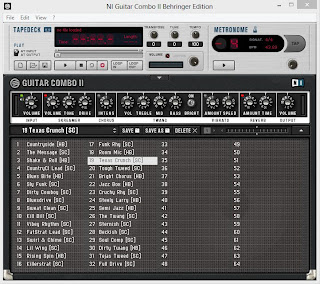
First, I had the serial number from when I originally registered the Guitar Combos software. You'll need that--and it doesn't appear that there's any way to register the software now, but I guess you could call Native Instruments. Let's assume though, that you have the serial number and the Guitar Combos CD. Point 2 is that the driver install file on the CD that came with the iAXE won't work for later versions (I tried it on Vista and it wouldn't even work on that--much less Windows 7 or 8.) You can download a new version of the driver software from the Behringer web site. And point 3 is that there's a specific order that you'll want to do things in to make it all work. I did install and register Guitar Combo 2 first--and it was a bit of an ordeal, but only because I was trying to use the serial number I got for GC 2 to register GC 1.

So if you remember which one you were using you can save yourself a lot of angst. The point is that Guitar Combos can be installed first and it doesn't seem to matter. And for the record, I was installing Guitar Combo 2 and the iAXE drivers on Windows 8 64 bit. If you're on 32 bit and an earlier version of Windows these steps should still work fine. One other note about the serial number. It's a 25 digit number and you should enter dashes between each set of 5 numbers--at least, that worked for me. Once you've correctly entered the serial number, the "Try" button will change to an "Activate" button. So, here's what you'll need to do.

1. Go to the Behringer web site and get the new installer file. Now you'll want to download the USB Driver, either 32 bit or 64 bit depending on your system. (Mac users, yours probably already works, but if not there is a list of MAC software for download.) So download BEHRINGER_2902_WIN32_2.8.40.zip or BEHRINGER_2902_X64_2.8.40.zip. Once that's downloaded unzip it, but don't run the setup.exe file yet.

 2. Plug your iAXE into your PC using the USB cable. The Windows OS will install drivers for it. Once that's done (Windows will tell you that your device is ready to use, but that's wrong) unplug your guitar from the PC.

 3. Now run the setup.exe file that you downloaded from Behringer. This is going to install the Asio driver for your iAXE. When the installer program tells you to, plug the iAXE back into the PC and when it finishes, go to step 4.

4. Launch your Guitar Combo software and in the setup screen that pops up, make sure it is set to Asio, 44100, and Behringer USB Audio as shown in the picture. Click ok, and as long as your headphones are plugged in to the headphone jack on the guitar (not the audio out on the PC or the pickup jack on the guitar) you should hear music (or at least really loud noise) and you should be able to select from the Guitar Combos presets, use the built in recording device, etc.

If you've lost your user manual from Behringer, you can probably find one online, but the link to the Behringer version is broken. Good luck and let's make some noise.

Friday, October 07, 2016

Restored 1929 Old Town Sponson Canoe


This is a vintage Old Town canoe that my father-in-law restored. Built in 1929, it was damaged in a tornado in April of 2011. It has been repaired and restored to original specs using historically accurate hardware and trim. And it's for sale.

All wood repairs were completed with carefully hand-crafted replacement pieces, and using hardware tacks and screws as specified by Old Town. The seats were restored by hand by a caning craftsman in Ohio. All woodwork was done by the current owner. The boat was repaired, re-canvassed with new canvas, sealed to Old Town specifications, and professionally painted to match the original color. New and replaced wood parts include the gunwales of spruce, sponson gunwales and keel of white oak, and decks of cherry. New bang irons, canvas, filler, and decals are supplied by the Fall River Canoe Company. 99% of the hardware screws are original hardware.

Sunday, November 30, 2014

Nexus 7 Tablet Performance Issues Solved

I think I have finally solved the performance problems I have been having with my ASUS Nexus 7 tablet. It's easy to find reports of problems with first generation Nexus tablets. A google search quickly reveals that lots of people have been having problems with these tablets for months. Upgrades to new versions of the Android OS don't solve the problem, in fact, they often seem to make the problem worse. That's certainly been my experience.

I got my tablet about 2 years ago. It worked beautifully at first, but over time got slower and slower. A few months ago I was hopeful that an upgrade to Android 4 would help. When it didn't really solve my problems, I was able to manage the problem using an app called "The Cleaner." By running this app frequently to free up storage and memory, I was able to use the tablet to read email, news, and stream Netflix to my Chromecast. But I would often have the same problems that others report--long delays when launching apps, frequent pop-ups reporting non-responsive apps, and slow, sometimes unusable performance from apps.

Then a few days ago the upgrade to Android 5.0 came and again I was hopeful that it would solve my problems. It only made them worse. Once I upgraded to 5.0, the tablet was essentially useless: very long delays in launching apps; the screen would go blank and the tablet would be unresponsive for several minutes. But after cleaning up a few things on the tablet, it seems to be working now, almost as good as new. Here's what I'd recommend you try to get going again with your Nexus 7.

If you can get the tablet running (be patient with it and just wait) you should launch the settings app. When you select the the "Apps" section of the settings, you'll eventually be able to see a list of all the downloaded and running apps. Switch to the list of "running" apps. Now you should see (I'm assuming you have upgraded to 5.0) an apps screen like the one shown here. By adding the amounts listed for System, Apps, and Free memory you can see that the device has 1 GB of memory. And you can see how much memory the currently running apps are using. In my case, the running apps were using too much memory. You can see from the list how much each app is using. There were several apps running and using memory that I really don't use. So I deleted those from the tablet. Once I got the memory in use down below 384 MB my tablet performance improve dramatically. Then when I deleted a couple more apps and got the memory in use down to 234 the performance was back to what I had when the tablet was new.

Wednesday, February 15, 2012

Free Music On Myspace?

How is this even possible? Why are more people not talking about it? It seems to good to be true. I can't imagine that it will last. So I guess you should just go get it while you can. Myspace currently has free, unlimited music, with a substantial catalog of older music--they have everything from Broadway shows, to Grace Slick, to Adele's Grammy Winning "21." I just can't fathom why there's been so little buzz about it, or who's paying for it. www.myspace.com/music

Friday, April 22, 2011

"I'm so glad we had this time together."

Or as they used to say on the airline skit on SNL, "OK, buh-BYE." If you're actually one of the 3 or 4 people who pay any attention at all to this self-indulgent glimpse into the carefully crafted public image I allow to represent what's going on inside my head, you might be wondering what's been happening here. For a few weeks now my co-workers have been in pursuit of self-improvement (oh, and CE credits) by completing a series of "23 Things" designed to help them develop new skills with technology. I'm a little handicapped in this effort since it takes a bit of effort beyond the assignments to feel like I've actually learned something. So, the preceding series of posts is largely my effort to take seriously the challenge of expanding my skills. At the same time, I wanted to try to offer something that might be useful or enlightening to anyone who might inexplicably find themselves here and decide to hang out for longer than it takes to type google.com in the address bar.

So now, having completed the 22 actual "Things" I'm left with Thing 23, reflection on the experience. I have two conclusions.

1. Technology is constantly evolving. Even a service like Flickr that I've been freeloading off of for years (I refuse to pay for it so I live with the 200 picture limit) is continually developing new features and changing the way the site works. So the work of staying caught up with that sort of technology is never finished. I can see why for some people that's not inspiring. In a place like a library that's built on the philosophical foundation that "knowledge is power" no one can really afford to sit still.

2. There's something significant to be said for the effect that shared experience has on people. I've seen the success of the "23 Things" concept first hand now and can attest that it had a positive impact on workplace morale that exceeded what I would have expected. Listening to people talk about their own experiences, they don't necessarily first mention how useful that database is or how handy that newsletter is. Instead, they talk about the people that helped them complete the exercises, the encouragement they got from others, or the courage they found in knowing that everyone was in it together. I don't think you can separate the value of those two experiences--the learning and the bonding. That combination is what makes it so difficult for online learning to measure up to classroom-based education, and it's why we all tend to end up being true to our school.

Congratulations to everyone who completed 23 Things. Thank you to the committee and sub-committee that made it happen. Now what?

(23--Fine)

Don't know what to read next? Try Novelist.


Novelist is a subscription service from EbscoHost that many public libraries offer to their registered users. It provides a number of ways to search for titles that you might enjoy, maybe because other people liked them, maybe because they're similar to other books that you liked, or perhaps because you're looking for something totally different from what you've been reading.

My favorite way to use Novelist is to put in a title that I really liked, and then look at the genre, subject, and location descriptors to see which things appealed to me the most. Then I use those for locating a new author or a related book, or maybe to branch out to something that I hadn't paid much attention to before. One author I discovered this way is Mayra Montero. She's a Cuban writer who I found on Novelist by starting my search with Gabriel Garcia Marquez. I've read several of her books and found each to be engaging and well written. Set in Caribbean tropical locales they contain intrigue and I feel immersed in a culture totally different from my own. She writes in Spanish and I think the translations were done by Edith Grossman, who has also translated Garcia Marquez. Montero's book In the Palm of Darkness is about a biologist searching for a near-extinct species of tree frog in a rain forest. It's a great introduction to her work for someone who's never given her a try.

If you have Louisville Free Public Library card, you can access Novelist from the Research Tools page.

(22)

Bookletters: they're like letters about books.

One under-appreciated service provided by many public libraries, including Louisville Free Public Library, is Bookletters, a collection of email newsletters that you can subscribe to. They vary in subject matter and frequency, but they all contain short descriptions about new or important books and a link back to your local public library catalog so you can check the catalog or place a hold request. I'm personally subscribed to the non-fiction Bookletter. It seems to me that this are really useful for library users who want to find something new to read. It's more informative than a simple list since you get descriptions, book jackets, etc. but briefer than a full review. And if I were still working the reference desk I'd be browsing these to know what people were going to be coming in looking for. Two of the most useful newsletters for that purpose have to be the "Book Sizzle" and "Books on the Air" Bookletters, which highlight the titles that are getting attention in the press or whose Authors have been making the rounds on popular TV talk shows.

(21)

"What can a rebuttal do to an incantation?"


Abraham Lincoln was more intellectual than you've ever been told. The Gettysburg Address was more thoughtfully and carefully prepared than you've ever understood. And its impact was at least as enormous as you've always thought it was.

I recently saw Black Swan at the cinema. And as good as that movie is, I wonder if it's hard to make a movie when you have Tchaikovsky's lush Swan Lake score as the musical backdrop for whatever is happening on the screen. Not to take anything away from the actors who did a first rate job in their respective roles, or the director who created some stunning visual images. But wouldn't you really also have enjoyed listening to the soundtrack while watching an unedited live webcam pointed out onto Central Park?

Likewise, I imagine it's hard to write a bad essay if you get to quote Lincoln's Gettysburg Address repeatedly. But Garry Wills has gone beyond that. In Lincoln at Gettysburg he's accomplished a couple of things that as a geeky historian type I find thrilling. First, he's explained exactly what the Gettysburg Address was and what it was not (for instance, it was NOT the keynote address of the day--that was a long-winded and best-left-forgotten speech by Edward Everett). And second, he's explained WHY it has become what it is for Americans--essentially a post-war (post Civil War, in case there's confusion about that) re-commitment to the principles of our nation's founding. But it was also a work of rhetorical genius that resulted from President Lincoln's intellect and learning. Not exactly the story as widely understood in American popular mythology. This is an important book, worthy of the Pulitzer Prize it won in 1993. Now time-tested, it's still a great read that will change how you look at Lincoln, how you hear the words and phrases of the Gettysburg Address, and how you view the last 150 years of American history.

(20)

In one ear and out the other?

Learn French by Podcast? I don't see how it could possibly work any less well than any of the other ways I've tried to learn a foreign language. And it wasn't wasted time really, since even if I'm still functionally uni-linugal, I can rock some crossword puzzles and occasionally figure out what I'm ordering at a French restaurant without having to say something like, "now what exactly are 'poissons?'"

So, I'm a "fan" of podcasts, but not so much a consumer of podcasts. That is, I've listened to some, and in one case even helped mount and "produce" one. But I've never been motivated enough or organized enough to actually have my itunes and my ipod conspire together to produce an ongoing body of work for me to listen to. So I still do podcasts the old fashioned way, by going to the site and getting the one I want and listening to it. I'll call it an area for future growth and leave it at that for now.

As for that podcast I helped produce? That would be the newly launched series of podcasts from the Louisville Free Public Library. Only one entry now, but more coming soon. Details? You can find those at iTunes, or here: http://www.lfpl.org/podcasts/authorseries.xml

(17)

Interesting? Maybe I hope not.

I had a professor on my thesis committee who used to "encourage" us never to describe anything as "interesting." He called that particular adjective a "non-word" that doesn't really describe whatever you're talking about. So his direction was to actually decide what it was you wanted to say, and say that instead. Over time I came to believe he was completely right about that. With that in mind, here's an interesting book that you can download from Netlibrary.com and listen to, in only 7 hours and 34 minutes. Well, you can download it and listen to it if you have an LFPL library card and an mp3 player (or, I suppose, a computer would do too.)

Interesting?

Eternal Chalice: the Grail in Literature and Legend
Modern Scholar; Unabridged.
by Potkay, Monica Brzezinski.
Publication: Prince Frederick, MD, [Boulder, Colo Recorded Books, 2007.
Subject: Grail.
Grail--Legends.
Grail in motion pictures.
Audiobooks.
Downloadable audio books.
Language: English
Duration: 7 Hours 34 Minutes
Product ID: 186125
EISBN: 9781429457613
ISBN: 9781428116764
File Size: 155 MB (CD Quality)

(16)

An interesting video? Yeah!

The "100% accurate" Louisville Youth Orchestra opening for My Morning Jacket at the Yum! Center on October 29, 2010. (15)


(15)

A Couple of Nice RSS feeds

If you want to keep track of new DVDs that have been added to the Library's collection, there's an RSS feed for that. You can find the RSS feed here. So, I added that to my Google reader feeds. There's a great selection of discs that includes Criterion collection movies, documentaries and PBS-type shows.

I also added a feed to the Library Renewal site. If you haven't gotten to know it, you might want to give it a look. Library Renewal is a group of library supporters, workers, and activists who are fostering dialogue about changes in the publishing industry and the effects of those changes on libraries. Their site is at www.libraryrenewal.org.

(13 & 14)

Tuesday, April 19, 2011

Round Up


Lucky photo of a ride at the Kentucky State Fair. ISO 100, f3.2, .25sec, 9mm.

Monday, March 21, 2011

Ól, ceol, bia agus craic

For good food you can't beat tapas at The Blue Dog Bakery and Cafe on Frankfort Avenue in Louisville. They're only open Thursday - Saturday evenings, from 7:00 pm until 10 or 11:00. Wine list and full bar, plus a variety of meat and veggie tapas and outstanding pizzas.

Need something good to listen to? How about some Arturo Sandoval. Try the free music player at http://www.arturosandoval.com/. Even people who think they don't like jazz are going to find their hips starting to move when they hear what this guy is doing.

And if you need to slow it down and read a good book while you're sitting on a beach or at poolside, for Summer reading I highly recommend Of Love and Other Demons by Gabriel García Márquez. This is a novella about demonic possession or intellectual obsession, or both. Beautifully translated from the original Spanish, it's a lyrical and mesmerizing storytelling turn from one of the great masters of our era.

[Insert non sequitur about wikis here:]
I can see where wikis can be really useful in some settings, and I've actually used and helped create at least one for that sort of thing. But I am one of those old fogeys who also doesn't think that a wiki is quite right for some endeavors. I don't think that the so-called wisdom of the collective mind is the equal in terms of authority and expertise a credentialed, focused, peer-reviewed body of research.

(18 - 19 -- in case you couldn't tell.)